


Để tạo trang tư vấn, tin tức, blog… hãy sử dụng giao diện Chatftk đang dùng. Quy trình tạo nhanh website giao diện Chatftk chuẩn như sau.
Cách 1: Tạo mới website nhanh chóng (nên dùng)
Quy trình tạo nhanh một website có giao diện của Chatftk mới toanh từ đầu như sau:
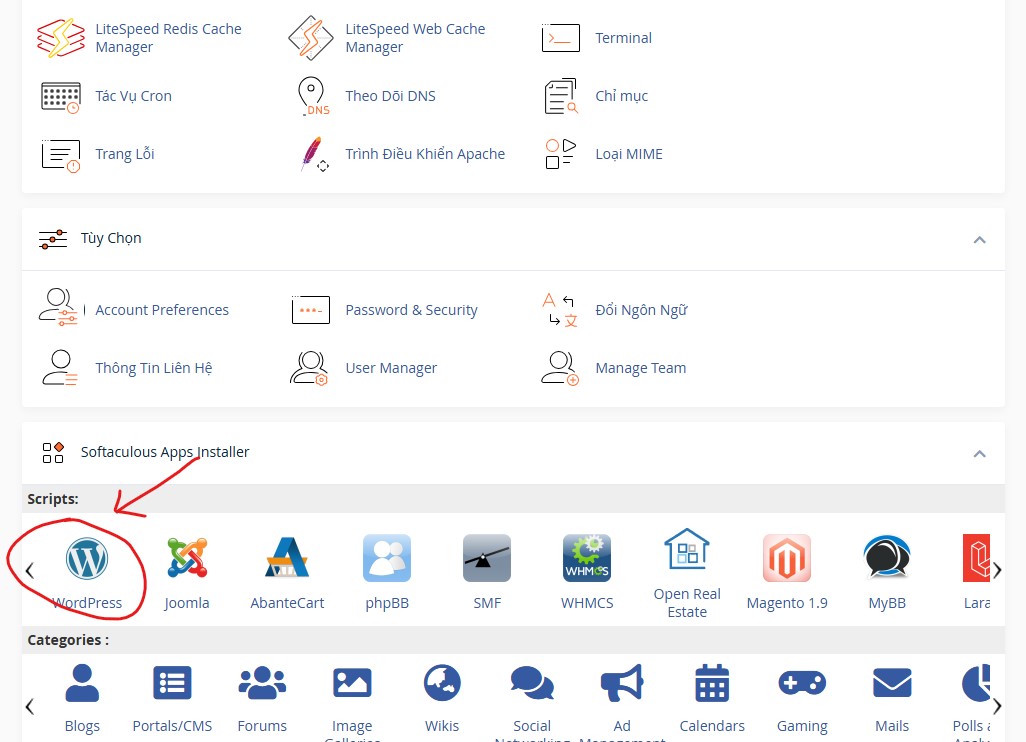
Bước 1: Truy cập cPanel của hosting (truy cập trang chủ hosting, đăng nhập, chọn dịch vụ và nút tắt đến cPanel). Tại cPanel chọn công cụ cài đặt nhanh wordpress để bắt đầu cài mới nhanh website wordpress.
Bước 2: Chọn Install, chọn tên miền cần cài wordpress, điền thông tin cần thiết và bấm Install (nhớ xóa wp_ mặc định để cài website vào thư mục chính của hosting)
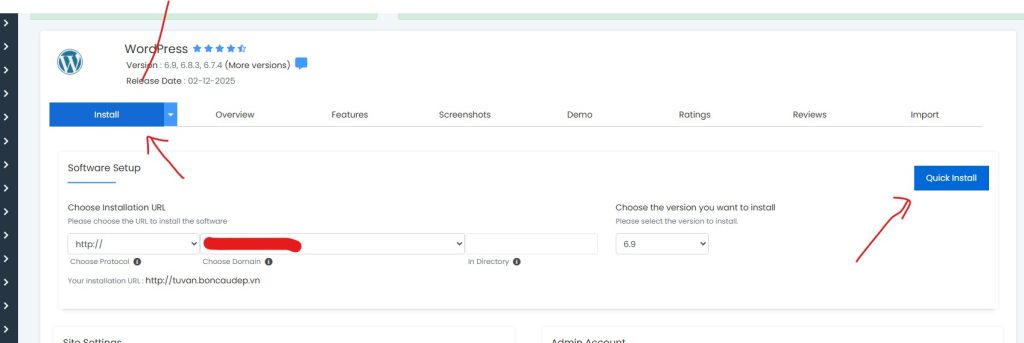
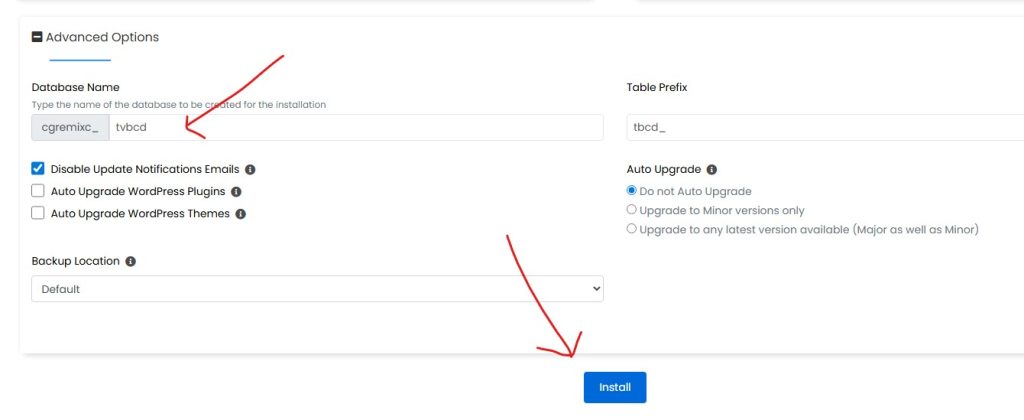
Bước 3: Chờ tiến trình cài đặt hoàn tất. Sau khi website cài đặt xong thì đăng nhập vào trang quản trị của wordpress, cài mới nhanh các plugin sau:
- Yoast SEO (Để SEO)
- Really Simple Security (Tạo chứng chỉ https)
- Child Theme Configurator (Tạo giao diện con)
- Shortcoder (Tạo short code)
- LiteSpeed Cache (Tăng tốc load web)
- kk Star Ratings (Đánh giá sao bài viết)
- Fixed Widget and Sticky Elements for WordPress (Thanh bên trượt)
Bước 4: Cài giao diện EnjoyLine
Bước 5: Cài đặt tiếng việt cho wordpress. Vào công cụ/child theme để tạo giao diện con (Tránh bị update giao diện gốc)
Bước 6: Sau khi cài xong giao diện con, kích hoạt giao diện con vừa được tạo ra. Sau đó vào công cụ/child theme bấm tab files, copy các file sau từ giao diện gốc sang giao diện con:
- comments.php
- header.php
- footer.php
- single.php
- template-parts/content-single.php
Bước 7: Vào Giao diện/sửa tập tin giao diện và thay thế code các file temple vừa copy của giao diện con như sau:
file comments.php:
<?php
/**
 * The template for displaying comments.
 *
 * This is the template that displays the area of the page that contains both the current comments
 * and the comment form.
 *
 * @link https://codex.wordpress.org/Template_Hierarchy
 *
 * @package enjoyline
 */

/*
 * If the current post is protected by a password and
 * the visitor has not yet entered the password we will
 * return early without loading the comments.
 */
if ( post_password_required() ) {
	return;
}
?>

<div id="comments" class="comments-area">
<div style="padding: 3px; background-color: #FFFFFF; border: 0px solid #d8d8d8; font-size: 1em;"><div style="text-transform: uppercase; border-bottom: 0px solid #CCCCCC; margin-bottom: 3px; font-size: 0.8em; font-weight: bold; display: block; text-align: center;"><span onClick="if (this.parentNode.parentNode.getElementsByTagName('div')[1].getElementsByTagName('div')[0].style.display != '') {  this.parentNode.parentNode.getElementsByTagName('div')[1].getElementsByTagName('div')[0].style.display = ''; this.innerHTML = '<b>Bấm để </b><a href=\'#\' onClick=\'return false;\'>Ẩn bình luận</a>'; } else { this.parentNode.parentNode.getElementsByTagName('div')[1].getElementsByTagName('div')[0].style.display = 'none'; this.innerHTML = '<b>Bấm đây </b><a href=\'#\' onClick=\'return false;\'>ĐỂ LẠI BÌNH LUẬN CỦA BẠN</a>'; }"><b>Bấm đây </b><a href="#" onClick="return false;">ĐỂ LẠI BÌNH LUẬN CỦA BẠN</a></span></div><div class="quotecontent"><div style="display: none;">


<?php
	// You can start editing here -- including this comment!
	if ( have_comments() ) : ?>
		<?php
			// Get comments title.
			$comments_number = number_format_i18n( get_comments_number() );
			if ( '1' === $comments_number ) {
				$comments_title = esc_html__( 'This Post Has One Comment', 'enjoyline' );
			} else {
				/* translators: %s: Comments number */
				$comments_title = sprintf( esc_html__( 'This Post Has %s Comments', 'enjoyline' ), $comments_number );
			}
			$comments_title = apply_filters( 'enjoyline_comments_title', $comments_title );
		?>
		<h2 class="comments-title">
			<?php echo esc_html( $comments_title ); ?>
		</h2>

		<?php if ( get_comment_pages_count() > 1 && get_option( 'page_comments' ) ) : // Are there comments to navigate through? ?>
		<nav id="comment-nav-above" class="navigation comment-navigation">
			<h2 class="screen-reader-text"><?php esc_html_e( 'Comment navigation', 'enjoyline' ); ?></h2>
			<div class="nav-links">

				<div class="nav-previous"><?php previous_comments_link( esc_html__( 'Older Comments', 'enjoyline' ) ); ?></div>
				<div class="nav-next"><?php next_comments_link( esc_html__( 'Newer Comments', 'enjoyline' ) ); ?></div>

			</div><!-- .nav-links -->
		</nav><!-- #comment-nav-above -->
		<?php endif; // Check for comment navigation. ?>

		<ol class="comment-list">
			<?php
				wp_list_comments( array(
					'style'      => 'ol',
					'short_ping' => true,
				) );
			?>
		</ol><!-- .comment-list -->

		<?php if ( get_comment_pages_count() > 1 && get_option( 'page_comments' ) ) : // Are there comments to navigate through? ?>
		<nav id="comment-nav-below" class="navigation comment-navigation">
			<h2 class="screen-reader-text"><?php esc_html_e( 'Comment navigation', 'enjoyline' ); ?></h2>
			<div class="nav-links">

				<div class="nav-previous"><?php previous_comments_link( esc_html__( 'Older Comments', 'enjoyline' ) ); ?></div>
				<div class="nav-next"><?php next_comments_link( esc_html__( 'Newer Comments', 'enjoyline' ) ); ?></div>

			</div><!-- .nav-links -->
		</nav><!-- #comment-nav-below -->
		<?php
		endif; // Check for comment navigation.

	endif; // Check for have_comments().


	// If comments are closed and there are comments, let's leave a little note, shall we?
	if ( ! comments_open() && get_comments_number() && post_type_supports( get_post_type(), 'comments' ) ) : ?>

		<p class="no-comments"><?php esc_html_e( 'Comments are closed.', 'enjoyline' ); ?></p>
	<?php
	endif;

	comment_form();
	?>


	</div></div></div>

</div><!-- #comments -->
file footer.php:
<?php
/**
* The template for displaying the footer.
*
* Contains the closing of the #content div and all content after.
*
* @link https://developer.wordpress.org/themes/basics/template-files/#template-partials
*
* @package enjoyline
*/
?>
</div><!-- #content .site-content -->
<footer id="colophon" class="site-footer">
<?php if ( is_active_sidebar( 'footer' ) ) { ?>
<div class="footer-columns clear">
<div class="container clear">
<?php dynamic_sidebar( 'footer' ); ?>
</div><!-- .container -->
</div><!-- .footer-columns -->
<?php } ?>
<div class="clear"></div>
<div id="site-bottom" class="<?php if ( !is_active_sidebar( 'footer' ) ) { echo 'no-footer-widgets'; } ?> clear">
<div class="container">
<?php
if ( has_nav_menu( 'footer' ) ) {
wp_nav_menu( array( 'theme_location' => 'footer', 'menu_id' => 'footer-menu', 'menu_class' => 'footer-nav' ) );
}
?>
<div class="site-info">
<?php
$enjoyline_theme = wp_get_theme();
?>
© <?php echo esc_html( date("o") ); ?> <a href="<?php echo esc_url( home_url() ); ?>"><?php echo esc_html( get_bloginfo('name') ); ?></a> - Vận hành bởi <a target="_blank" href="https://ftk.vn/">FTK Việt Nam</a>
<a href="//www.dmca.com/Protection/Status.aspx?ID=02645c36-090c-4e85-87af-8a6128e7143b" title="DMCA.com Protection Status" class="dmca-badge"> <img src ="https://images.dmca.com/Badges/dmca-badge-w100-5x1-05.png?ID=02645c36-090c-4e85-87af-8a6128e7143b" alt="DMCA.com Protection Status" /></a> <script src="https://images.dmca.com/Badges/DMCABadgeHelper.min.js"> </script>
</div><!-- .site-info -->
</div><!-- .container -->
</div>
<!-- #site-bottom -->
</footer><!-- #colophon -->
</div><!-- #page -->
<div id="back-top">
<a href="#top" title="<?php echo esc_attr_e('Back to top', 'enjoyline'); ?>"><span class="genericon genericon-collapse"></span></a>
</div>
<?php wp_footer(); ?>
</body>
</html>
<style>.float-qc {
position: fixed;
padding: 5px;
bottom: 0px;
left: 0px;
z-index: 99999;
max-width: 800px;
}
@media screen and (max-width: 600px) {
.float-contact {min-width: 100%;}
}
.call {
position: fixed;
bottom: 40px;
left: 0px;
z-index: 99999;
max-width: 800px;
}
.call .hotline {
border: 0px; border-radius: 50%;
}
</style>
<div class="call">
<div class="hotline">
<a href="tel:0966539533"><img width="60" src="https://i64.servimg.com/u/f64/18/00/06/60/button10.gif" alt="Gọi: 0966.539.533"></a>
</div>
</div>
<div class="float-qc" align="center">
<div class="tieudeqc">
</div>
<div class="bamqc"><a class="myButton" href="http://zalo.me/0966539533">NHẮN TIN ZALO</a></div>
</div>file header.php:
<?php
/**
 * The header for our theme.
 *
 * This is the template that displays all of the <head> section and everything up until <div id="content">
 *
 * @link https://developer.wordpress.org/themes/basics/template-files/#template-partials
 *
 * @package enjoyline
 */

?><!DOCTYPE html>
<html <?php language_attributes(); ?>>
<head>
<meta charset="<?php bloginfo( 'charset' ); ?>">
<meta name="viewport" content="width=device-width, initial-scale=1">
<meta http-equiv="X-UA-Compatible" content="IE=edge">
<meta name="HandheldFriendly" content="true">
<link rel="profile" href="https://gmpg.org/xfn/11">
<?php wp_head(); ?>
</head>

<body <?php body_class(); ?>>

<?php
	//wp_body_open hook from WordPress 5.2
	if ( function_exists( 'wp_body_open' ) ) {
	    wp_body_open();
	} else {
	    do_action( 'wp_body_open' );
	}
?>

<div id="page" class="site">

	<a class="skip-link screen-reader-text" href="#content"><?php esc_html_e( 'Skip to content', 'enjoyline' ); ?></a>

	<header id="masthead" class="site-header clear">

		<?php
			the_custom_header_markup();
		?>

		<div class="container">

			<div class="site-branding">

				<?php if ( has_custom_logo() ) { ?>

					<div id="logo">
						<?php the_custom_logo(); ?>
					</div><!-- #logo -->

				<?php } ?>

				<?php if (display_header_text()==true) { ?>

					<div class="site-title-desc">

						<div class="site-title no-desc">
							<h1><a href="<?php echo esc_url( home_url() ); ?>"><?php bloginfo('name'); ?></a></h1>
						</div><!-- .site-title -->

						<div class="site-description">
							<?php bloginfo('description'); ?>
						</div><!-- .site-desc -->

					</div><!-- .site-title-desc -->

				<?php } ?>

			</div><!-- .site-branding -->

			<nav id="primary-nav" class="primary-navigation">

				<?php
					if ( has_nav_menu( 'primary' ) ) {
						wp_nav_menu( array( 'theme_location' => 'primary', 'menu_id' => 'primary-menu', 'menu_class' => 'sf-menu', 'link_before' => '<span class="menu-text">','link_after'=>'</span>' ) );
					}
				?>

			</nav><!-- #primary-nav -->

			<div class="header-search-icon">
						<button class="toggle search-toggle mobile-search-toggle" data-toggle-target=".search-modal" data-toggle-body-class="showing-search-modal" data-set-focus=".search-modal .search-field" aria-expanded="false">
							<span class="toggle-inner">
								<span class="toggle-icon">
									<i class="fa fa-search"></i>
								</span>
							</span>
						</button><!-- .search-toggle -->
			</div>

			<div class="header-toggles">
				<button class="toggle nav-toggle mobile-nav-toggle" data-toggle-target=".menu-modal"  data-toggle-body-class="showing-menu-modal" aria-expanded="false" data-set-focus=".close-nav-toggle">
					<span class="toggle-inner">
						<span class="toggle-icon">
							<?php enjoyline_the_theme_svg( 'ellipsis' ); ?>
						</span>
						<span class="toggle-text"><?php esc_html_e( 'Menu', 'enjoyline' ); ?></span>
					</span>
				</button><!-- .nav-toggle -->
			</div><!-- .header-toggles -->

			<?php get_template_part( 'template-parts/modal-search' ); ?>

		</div><!-- .container -->

	</header><!-- #masthead -->

	<div class="menu-modal cover-modal header-footer-group" data-modal-target-string=".menu-modal">

		<div class="menu-modal-inner modal-inner">

			<div class="menu-wrapper section-inner">

				<div class="menu-top">

					<button class="toggle close-nav-toggle fill-children-current-color" data-toggle-target=".menu-modal" data-toggle-body-class="showing-menu-modal" aria-expanded="false" data-set-focus=".menu-modal">
						<span class="toggle-text"><?php esc_html_e( 'Close Menu', 'enjoyline' ); ?></span>
						<?php enjoyline_the_theme_svg( 'cross' ); ?>
					</button><!-- .nav-toggle -->

					<?php

					$mobile_menu_location = '';

					// If the mobile menu location is not set, use the primary location as fallbacks, in that order.
					if ( has_nav_menu( 'mobile' ) ) {
						$mobile_menu_location = 'mobile';
					} elseif ( has_nav_menu( 'primary' ) ) {
						$mobile_menu_location = 'primary';
					}

					?>

					<nav class="mobile-menu" aria-label="<?php esc_attr_e( 'Mobile', 'enjoyline' ); ?>" role="navigation">

						<ul class="modal-menu reset-list-style">

						<?php
						if ( $mobile_menu_location ) {

							wp_nav_menu(
								array(
									'container'      => '',
									'items_wrap'     => '%3$s',
									'show_toggles'   => true,
									'theme_location' => $mobile_menu_location,
								)
							);

						} else {

							wp_list_pages(
								array(
									'match_menu_classes' => true,
									'show_toggles'       => true,
									'title_li'           => false,
									'walker'             => new EnjoyLine_Walker_Page(),
								)
							);

						}
						?>

						</ul>

					</nav>

				</div><!-- .menu-top -->

			</div><!-- .menu-wrapper -->

		</div><!-- .menu-modal-inner -->

	</div><!-- .menu-modal -->

<div class="header-space"></div>

<div id="content" class="site-content container <?php if( (!is_active_sidebar( 'home-sidebar' )) && (!is_active_sidebar( 'sidebar-1' )) ) { echo 'is_full_width'; } ?> clear">

	<?php
		if ( is_home() && (!get_query_var('paged')) ) {
			get_template_part('template-parts/content', 'featured');
		}
	?>
file single.php:
<?php
/**
 * The template for displaying all single posts.
 *
 * @link https://developer.wordpress.org/themes/basics/template-hierarchy/#single-post
 *
 * @package enjoyline
 */

get_header();
?>

	<div id="primary" class="content-area">

		<main id="main" class="site-main" >

		<?php
		while ( have_posts() ) : the_post();

			get_template_part( 'template-parts/content', 'single' );

			// If comments are open or we have at least one comment, load up the comment template.
			if ( comments_open() || get_comments_number() ) :
				comments_template();
			endif;

		endwhile; // End of the loop.
		?>

		</main><!-- #main -->
	</div><!-- #primary -->

<?php get_sidebar(); ?>
<?php get_footer(); ?>
file content-single.php:
<?php
/**
 * The template for displaying all single posts.
 *
 * @link https://developer.wordpress.org/themes/basics/template-hierarchy/#single-post
 *
 * @package enjoyline
 */

get_header();
?>

	<div id="primary" class="content-area">

		<main id="main" class="site-main" >

		<?php
		while ( have_posts() ) : the_post();

			get_template_part( 'template-parts/content', 'single' );

			// If comments are open or we have at least one comment, load up the comment template.
			if ( comments_open() || get_comments_number() ) :
				comments_template();
			endif;

		endwhile; // End of the loop.
		?>

		</main><!-- #main -->
	</div><!-- #primary -->

<?php get_sidebar(); ?>
<?php get_footer(); ?>
Vào Giao diện/tùy chỉnh, chọn css bổ sung và paste vào code sau:
.wp-custom-header {min-height:80px; background: #1d1d1d;}
header {min-height:80px; background: #1d1d1d;}
.site-branding #logo {margin-top: 3px;}
.sf-menu li a {color: #ababab; font-size: 15px;}
.site-branding img {padding: 5px;}
#menu-item-17 a {color:white;}
.fa {color: white;}
.header-toggles .toggle-text {color: white;}
.header-toggles .toggle-icon svg {fill: white;}

.toggle-inner {margin-right: 20px;}

#featured-content .hentry .entry-header {background: #00000033;}

.site-content {margin-top: 10px;}

a {color: #48b164;}

.content-loop .thumbnail-link img {border-radius:0%;}
.content-loop .entry-summary {color: #636263;}

.single #primary article.hentry {padding:0px;}

.single .entry-header {background: white; margin-bottom:0px;}
.entry-header {background: white;}
.page-header {background: white;}
.single h1.entry-title {font-size: 38px; text-align: center; padding:5px;}
.single #primary .entry-header .entry-meta {text-align: right; margin-bottom:0px; padding-right: 5px;}
.single #primary .entry-header .entry-author a {font-size: smaller; display:none;}
.entry-categories a {background-color: #66ae72; padding:1 0 0px; font-size: 12px; font-weight: 400; margin-right: 0px;}


.entry-content {padding:0px;}
.entry-content p, .entry-content li {padding-left:20px; padding-right:20px; text-align: justify;}
h1, h2, h3, h4, h5, h6 {padding-left: 10px; padding-right: 10px;}

.entry-content a {text-decoration: none; color: #387cc5;}

.entry-content pre {background: #287028;}

.comments-area {background: #f7f7f7}
.comment-form textarea {height:100px;}
.form-submit {text-align:center;}

.author-desc {font-size: 15px; line-height: 1.5;}

.content-loop .hentry {padding-bottom: 10px; margin-bottom:10px;}
.content-loop .entry-title {font-size: 16pt; line-height: 1.2;}
.entry-related .content-loop.content-loop .thumbnail-link {width:100px; margin: 0 15px 0px 0;}
.entry-related .content-loop.content-loop .entry-summary  {display:none;}
.entry-related .content-loop .entry-meta {display: none;}
.content-loop .entry-category {margin-bottom: 0px;}
.content-loop .entry-category a {background: white; color:gray; font-size:11px; font-weight:400; border-bottom: 1px solid;}

.wp-block-categories {padding-left: 50px;}
.sidebar .widget ul > li {list-style: disc; margin-left:20px;}


@media screen and (max-width: 1080px) {
	.author-box {margin-top:0px;}
}

@media screen and (max-width: 780px) {
	.content-loop .thumbnail-link {max-width:40%;}
	.pc {display: none;}
}

@media screen and (max-width: 480px) {
	.thumbnail-wrap {padding-top: 10px;}
	.single #primary article.hentry {border: 0px;}
	.content-loop .hentry {padding-left:5px;}
	.content-loop .entry-meta {display: blck; float: right;}
	.content-loop .entry-summary {font-size: 11pt; margin-bottom:20px; line-height: 1.6; text-align: justify; padding-left: 10px; padding-right: 10px;}
	.comment-form-url {display: none;}
	.comment-form .submit {width: 100%;}
	.container {width:100%;}
	.site-content {margin-top: 0px;}
}


.myButton {
	-moz-box-shadow: 0px 1px 0px 0px #fff6af;
	-webkit-box-shadow: 0px 1px 0px 0px #fff6af;
	box-shadow: 0px 1px 0px 0px #fff6af;
	background:-webkit-gradient(linear, left top, left bottom, color-stop(0.05, #ffec64), color-stop(1, #ffab23));
	background:-moz-linear-gradient(top, #ffec64 5%, #ffab23 100%);
	background:-webkit-linear-gradient(top, #ffec64 5%, #ffab23 100%);
	background:-o-linear-gradient(top, #ffec64 5%, #ffab23 100%);
	background:-ms-linear-gradient(top, #ffec64 5%, #ffab23 100%);
	background:linear-gradient(to bottom, #ffec64 5%, #ffab23 100%);
	filter:progid:DXImageTransform.Microsoft.gradient(startColorstr='#ffec64', endColorstr='#ffab23',GradientType=0);
	background-color:#ffec64;
	-moz-border-radius:16px;
	-webkit-border-radius:16px;
	border-radius:14px;
	border:1px solid #ffaa22;
	display:inline-block;
	cursor:pointer;
	color:#333333;
	font-family:Arial;
	font-size:18px;
	font-weight:bold;
	padding:3px 15px;
	text-decoration:none;
	text-shadow:0px 1px 0px #ffee66;
}

.myButton:hover {
	background:-webkit-gradient(linear, left top, left bottom, color-stop(0.05, #ffab23), color-stop(1, #ffec64));
	background:-moz-linear-gradient(top, #ffab23 5%, #ffec64 100%);
	background:-webkit-linear-gradient(top, #ffab23 5%, #ffec64 100%);
	background:-o-linear-gradient(top, #ffab23 5%, #ffec64 100%);
	background:-ms-linear-gradient(top, #ffab23 5%, #ffec64 100%);
	background:linear-gradient(to bottom, #ffab23 5%, #ffec64 100%);
	filter:progid:DXImageTransform.Microsoft.gradient(startColorstr='#ffab23', endColorstr='#ffec64',GradientType=0);
	background-color:#ffab23;
}
.myButton:active {
	position:relative;
	top:1px;
}
Vậy là xong giao diện webstie, tiến hành các cài đặt khác như cài đặt đường dẫn bài viết, chữ ký hồ sơ… để chuẩn chỉnh website.
Cách 2: Sao lưu và nhân bản (hoặc khôi phục) website từ website có sẵn
Cách sao lưu 1 website có sẵn và nhân bản để tạo 1 website mới giống với website sẵn có. Cách này có thể phát sinh một số lỗi nên không khuyến khích dùng, chỉ nên dùng cách này khôi phục website về trạng thời điểm sao lưu. Để sao lưu website gốc phục vụ cho việc nhân bản hoặc khôi phục website thì cần phải sao lưu được 2 file đó là database và phpMyAdmin. Việc khôi phục website và nhân bản website là giống nhau, khác ở chỗ: khôi phục website là khôi phục lại dữ liệu website trên chính thư mục cũ nên mọi thông tin kết nối giữa database và phpMyAdmin đã trùng khớp sẵn, chỉ việc upload file lên là xong. còn nhân bản website là upload dữ liệu thư mục khác (do tên miền khác) nên phải thêm bước điều chỉnh một số thông tin để khớp nối giữa dữ liệu website gốc và website mới. Cách sao lưu và khôi phục như sau:
Bước 1: Sao lưu website gốc
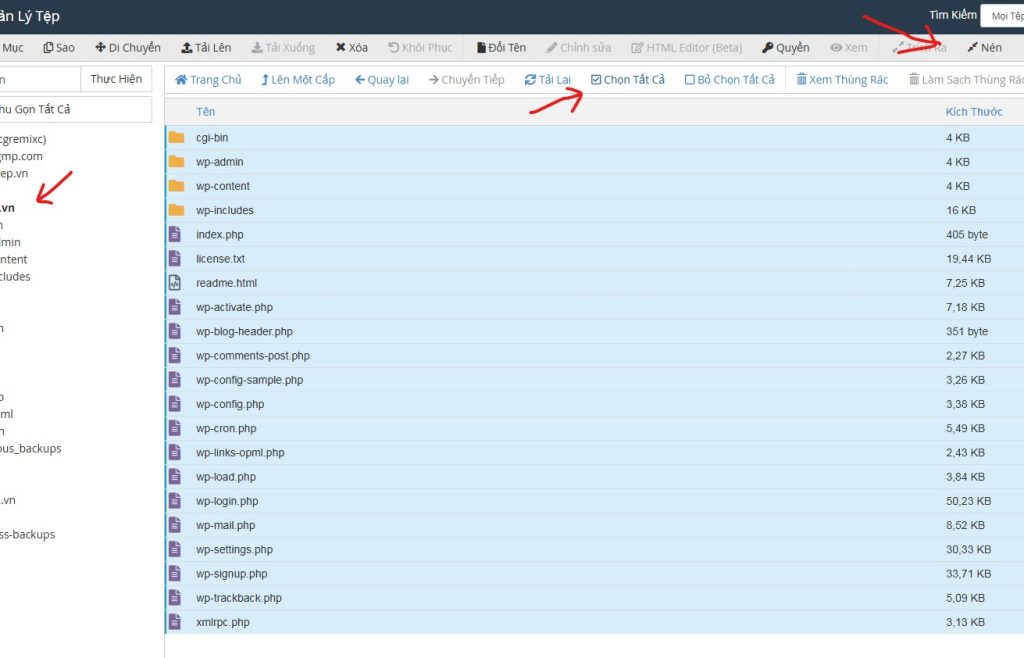
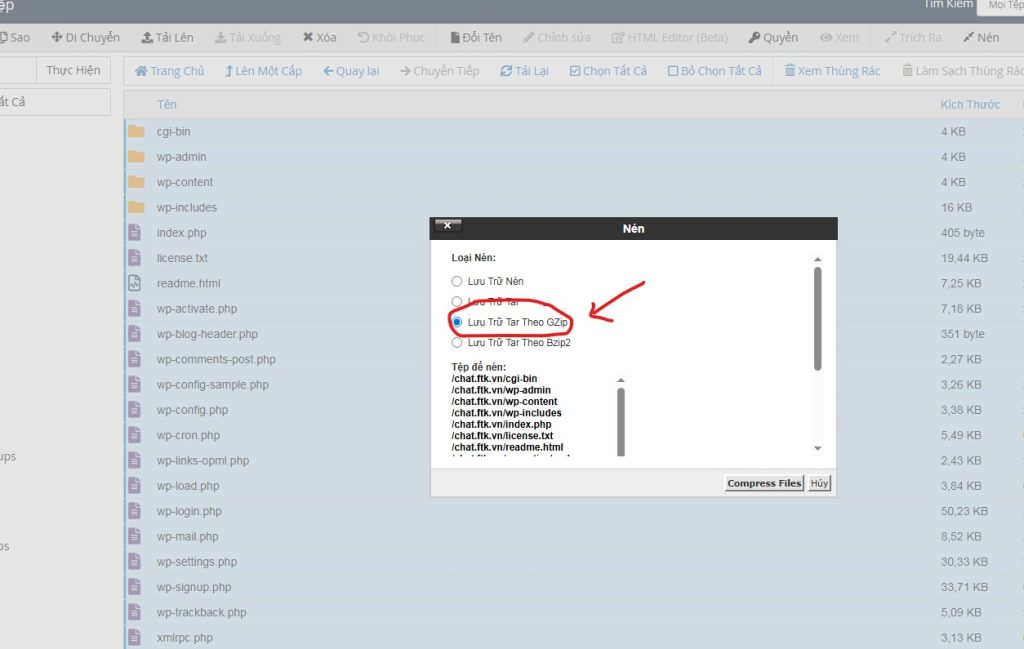
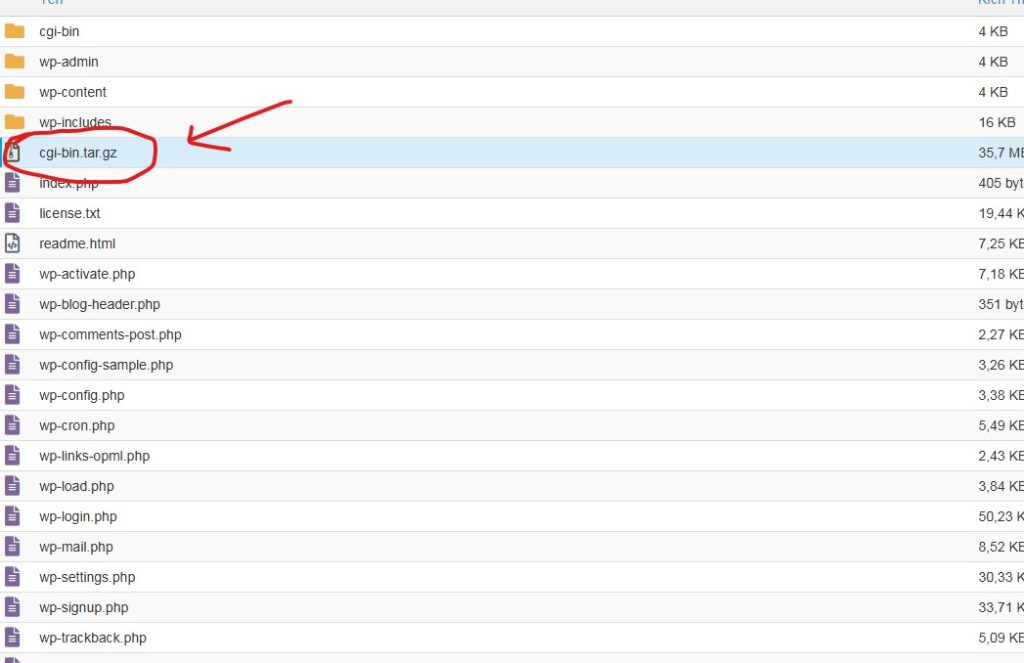
– Tại bảng cPanel, chọn bộ quản lý tệp, chọn thư mục website cần backup, chọn tất cả các file trong thư mục đó và bấm công cụ nén, chọn loại file nén là GZip và tiến hành nén, sau khi nén xong sẽ có một file nén xuất hiện ở thư mục đang chọn, bạn tải file nến đó về là đã lưu được database của website. Tải xong bạn có thể xóa file nén đó đi.
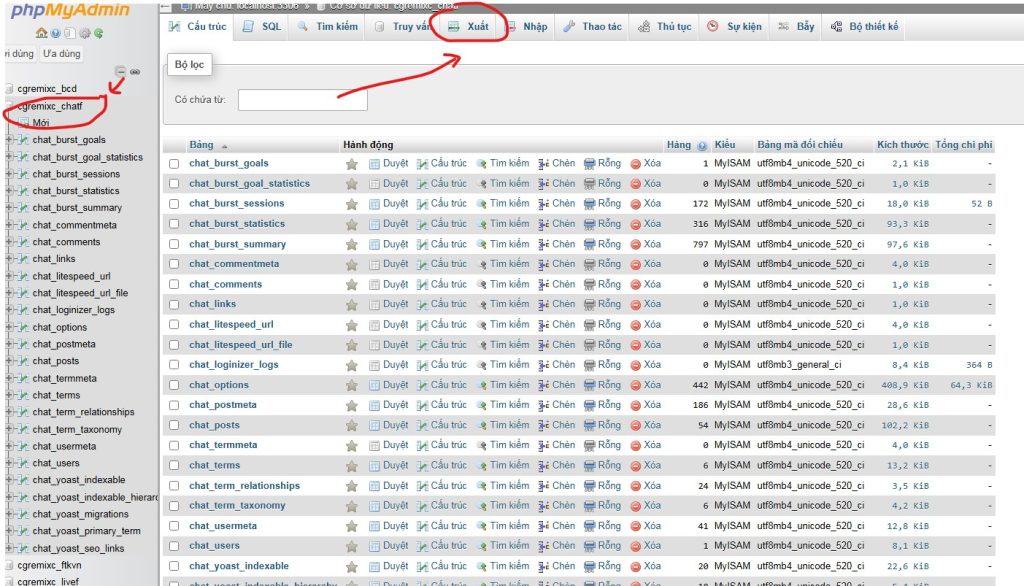
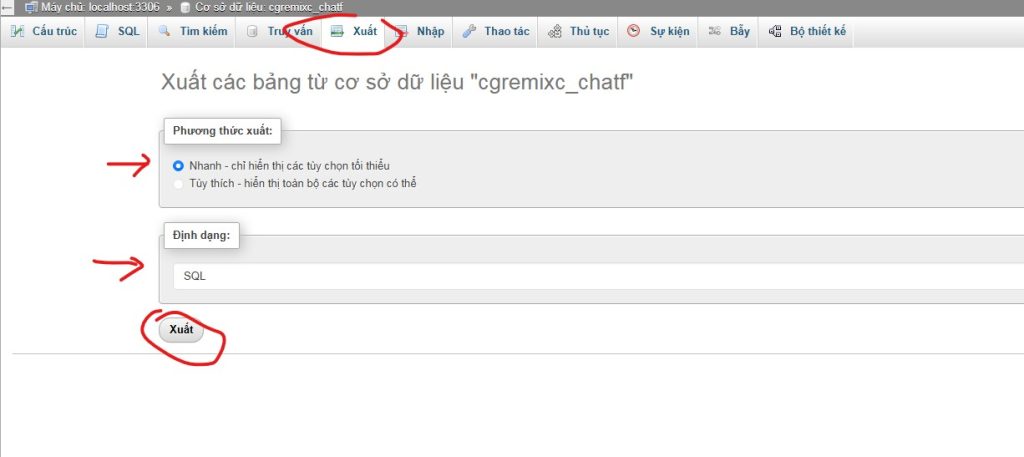
– Tại bảng cPanel, chọn phpMyAdimin, chọn cơ sở dữ liệu cần xuất (tên cơ sở dữ liệu có thể xem trong wp-config.php của database để đảm bảo chọn đúng cơ sở dữ liệu cần xuất) và nhấn nút “xuất”, để tùy chọn mặc định và bấm xuất, lưu file này là đã lưu được phpMyAdmin của website.
Vậy là xong bước sao lưu website. Hai file vừa lưu được có thể sử dụng để khôi phục hoặc nhân bản website. Bước khôi phục hoặc nhân bản có thể thuê dịch vụ cài đặt chuyên nghiệp.
Bước 2: Khôi phục hoặc nhân bản website
Để khôi phục, chỉ cần xóa toàn database trong thư mục website cũ và upload lại database mới, sau đó giải nén ra. Tương tự xóa cơ sở dữ liệu trong phpMyAdmin và import lại.
